


Questions Answered, Families Supported
We know you have questions about autism, diagnosis, and ABA therapy. This page holds the answers families ask us most, gathered from years of working with parents who want to understand what comes next.
Early intervention refers to supportive services provided during early childhood to help children diagnosed with autism build communication, social, and daily living skills during critical developmental stages.
We do not anticipate a gap in coverage for currently benefits-eligible Discover Hope employees who enroll in ACES coverage. Discover Hope coverage will remain in place through September 30, and ACES coverage for eligible team members who enroll will begin October 1.
If developmental differences are persistent or affect daily life, learning, or relationships, it’s appropriate to discuss concerns with a pediatrician or qualified clinician at any age.
Yes. ACES offers a 401(k) retirement plan. Team members who are eligible to participate will receive information about the ACES 401(k) and enrollment process within the first 15 days of their ACES employment.
Yes. Autism is lifelong. Signs in teens and adults may include social fatigue, sensory sensitivities, strong routines, intense interests, and challenges with planning or transitions. These signs can be managed through skills and through advocating for needs to set up life for success.
Your eligible Discover Hope PTO balance will be paid out to you as part of the transition. Rather than transferring your existing balance to ACES, Discover Hope will pay out any applicable accrued PTO.
Eligible full-time employees will begin accruing ACES PTO on their first day of full-time employment with ACES.
ACES wants to honor preplanned time off. If you have PTO that was arranged while at Discover Hope, as a courtesy to you, ACES will allow you to use PTO even if you have not yet accrued enough ACES PTO to cover the full absence. This may temporarily create a negative ACES PTO balance while you accrue the time back.
Our goal is to maintain existing schedules to the best of our ability during the transition. Schedules and hours may change based on client needs, including client discharge. Over time, we also hope to provide Discover Hope team members opportunities to work with additional ACES clients.
Our intention is to preserve existing team member and client relationships wherever possible as clients transition to ACES. Individual circumstances may require adjustments, but continuity of care is an important priority.
For the majority of team members, we expect existing supervisory relationships to remain in place initially. We will communicate directly with you if your reporting relationship will change.
Not immediately. Within approximately the first 120 days, we will work toward aligning scheduling practices with the ACES model. Changes will be communicated and supported before they are implemented.
Beginning October 1, ACES policies and practices will generally apply, including policies related to cancellations, drive time, mileage, breaks, documentation, availability, and other employment practices, unless a specific exception has been communicated to you.
During the transition period of Sept 8th - Sept 30th, you may simultaneously be an employee of Discover Hope and ACES. You will continue performing your normal Discover Hope work and will be paid by Discover Hope for those hours. Separately, you will complete ACES onboarding and training and will be paid by ACES for those hours.
Yes. You should continue your normal Discover Hope schedule unless you are told otherwise.
ACES training will generally be completed in addition to your normal Discover Hope working hours during September. After you accept your offer, ACES will work with you to establish a training schedule that takes your current Discover Hope schedule into consideration.
The amount and type of training required will depend on your position. Your specific training requirements and schedule will be shared after you accept your ACES offer.
Some training must be completed before you can begin serving clients through ACES on October 1, and ACES will clearly identify those requirements. If other training cannot reasonably be completed by October 1, we will work with you on an appropriate completion timeline.
You will be introduced to several ACES systems based on your role: SmarterU for learning and training; Paycom for HR, payroll, onboarding and employee information; Outlook and Microsoft Teams for communication and collaboration; and CentralReach for clinical timekeeping and other clinical workflows.
ACES is an ABA provider with more than 30 years of experience and a purpose of enhancing lives and helping more people reach their potential. Our vision is simple but ambitious: to be the best at what we do, for our clients and families and for the team members who make that impact possible.
We believe the best outcomes happen when exceptional clinical care and an exceptional team member experience go hand in hand. Our clinical approach is grounded in individualized, high-quality care, using data and clinical expertise to help each client make meaningful progress. That commitment is reflected in our ability to deliver approximately 2X clinical outcomes per therapy hour.
But being the best isn't only about clinical outcomes. It's also about how we get there: creating an environment where team members feel supported, continue to learn and grow, build meaningful careers, and work alongside people who care deeply about one another and the families we serve.
As Discover Hope joins ACES, we're excited to share what we've built and, just as importantly, to learn from and build on what has made Discover Hope special.
ACES' clinical model is grounded in our purpose: enhancing lives and helping more people reach their potential. That means continually asking how we can help each client make the most meaningful progress possible with every hour of care.
ACES is an industry leader in clinical outcomes, delivering approximately 2X clinical outcomes per therapy hour above industry benchmark. Our model brings together individualized treatment, clinical expertise, data-informed decision making, and strong partnerships with families to help clients make meaningful, measurable progress.
We're incredibly proud of these outcomes, but we know they are only possible because of the expertise, judgment, and dedication of our clinical teams. ACES empowers "behavioral artistry" (clinical autonomy to individualize your evidence-based methodologies and interventions) powered by state-of-the-art clinical technology toward elevating the highest clinical outcomes.
For team members who join ACES, we'll provide training, tools, and ongoing clinical support to help you learn our approach while building on the experience and expertise you already bring from Discover Hope.
Learning, development, and career growth are some of ACES' greatest strengths and are consistently among the reasons team members choose to build and continue their careers here. We believe that when our people grow, our clients, teams, and organization grow with them.
ACES offers development at every stage of a career, from structured support and mentorship for behavior technicians pursuing BCBA certification to ongoing clinical development, mentorship, and leadership opportunities for clinicians and leaders. As a growing organization, there are also opportunities to take on new responsibilities, develop new areas of expertise, and explore different career paths over time.
We want ACES to be a place where you can continue to learn, grow, and reach your own potential while helping our clients reach theirs.
Reach out to Jill Prentice: jprentice@acesaba.com
Reach out to Dika Karakashian: dkarakashian@acesaba.com
Reach out to Eugene Murphy: emurphy@acesaba.com
Yes. We will host two HR 101 meetings during the transition where you can learn more about joining ACES and ask questions directly of Jill Prentice, ACES' Chief People Officer. Meeting dates, times, and access information will be shared separately.
Weekly transition updates will be sent to your Discover Hope email through September 30. Beginning October 1, transition and company communications will be sent to your ACES email.
- Look for your individual ACES offer letter in your Discover Hope email.
- Review your offer and submit your acceptance by September 6, 2026 if you plan to join ACES.
- Watch for ACES onboarding instructions after accepting your offer.
- Continue your normal Discover Hope work and schedule unless you are told otherwise.
- Continue checking your Discover Hope email for weekly transition updates through September 30.
- Attend one of the upcoming HR 101 sessions if you have questions or would like to learn more about joining ACES.
- Revisit this FAQ page. As additional questions are asked and answered, they will be listed here.
To access your account, log into CentralReach login with your standard username and password that you would have used for Ally. (If you have never logged in, use the First Time User Link available at login page)
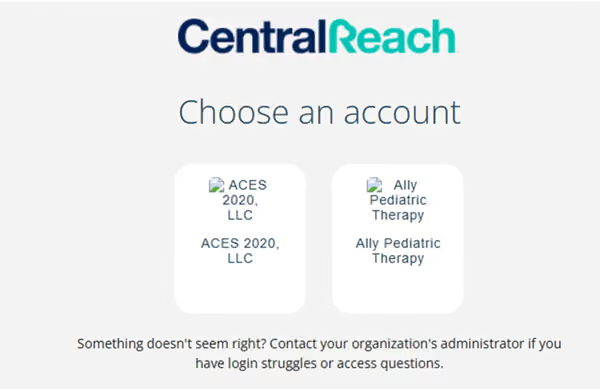
Upon attempt to login to CentralReach Client Portal you should now encounter a dual login option to select which organization you would like to view. Ally Pediatric will be your historical reference for service dates before 4/1/26, whereas ACES 2020 LLC will be your going forward reference for service dates of 4/1/26 and onward.
If you don't see two tiles and should, it's likely there's not a perfect match of name, date of birth, and email between the two accounts. Contact Client Onboarding for support.
Note: Ally CentralReach will have Client Files, however ACES CentralReach will not house your client files. Please reach out to Records@acesaba.com to request clinical documentation. The ACES Client Connect Portal will house ACES policy documentation and profile information.
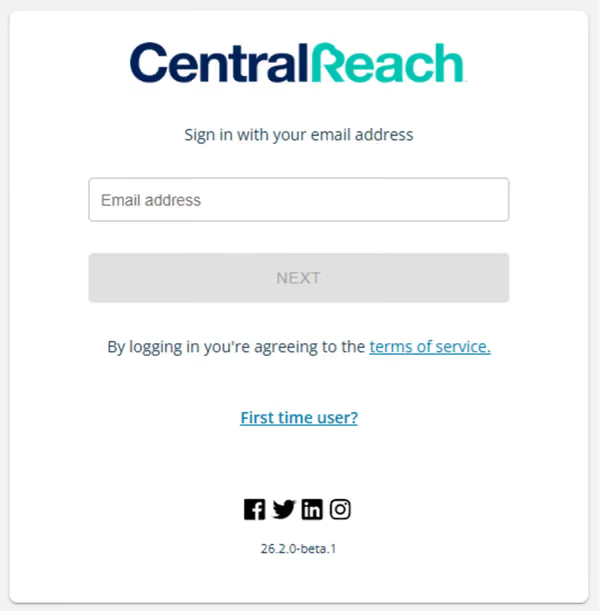
When logging in to the CentralReach Client Portal with SSO for the first time:
- Navigate to login.centralreach.com.
- Click First Time User?
- Select CentralReach.
- Enter your email address in the “Email Address" field and select the reCAPTCHA checkbox, then select Send Link.
- If the user exists within CentralReach, they will receive a "Set up your CentralReach Account" email. An email is not sent if the user does not exist within CentralReach.
- Select Confirm Access & Set Up Password in the email to navigate to the “Set Password” screen.
- When the password meets CentralReach’s requirements and is accepted, the page reloads and displays a hyperlinked “click here to continue” message that redirects users to the login screen.
- Upon returning to the login screen, log in with your email address and password. Users will be directed to the CentralReach Client Portal.
If you have logged into CentralReach previously and you do not remember your password, follow steps below:
- Navigate to login.centralreach.com.
- Enter your email address in the “Email Address" field and click Next
- Click Reset Password
- If that email is found, you will receive a “Set Password” email from CentralReach. Follow steps to reset password and reattempt login when complete.
Email addresses were migrated from Ally CentralReach to ACES CentralReach. Use the same email you had previously provided to Ally.
- Select the way you would like to sign-in, either using your registered email or mobile phone number that can receive SMS text messages.
- If you selected an email domain option, you will be taken to a login page for the email account associated with your domain account. Please login using your domain credentials.
- Important: if you are logged into more than one domain account (e.g. multiple Microsoft accounts), please log out of all accounts and then log back in to the account associated with the email address you provided at registration.
- If you selected “Sign in with Phone Number”, please input your phone number and click “Continue”
- Select either “Send Code” or “Call Me” and you will receive a security code at the phone number you provided
- Input the code and then select “Verify Code”
- If you selected an email domain option, you will be taken to a login page for the email account associated with your domain account. Please login using your domain credentials.
- If login is successful, you will be redirected to your ACES Account Portal
Each code is temporary and helps keep your information secure.
Yes, please call the school if you would like to set up a time to tour our school. (619) 964-6321
Each student follows an individualized daily schedule based on their IEP goals and our functional skills curriculum.
Unfortunately, we do not have open enrollment. We only accept students with referrals from school districts within San Diego County. We do not accept private pay at this time.
A non-public school is a privately operated school, publicly funded by school districts to support students whose needs cannot currently be met within a traditional public school setting. Students are referred through their IEP teams and come to us from school districts throughout San Diego County.
We serve students who have severe communication, learning, social, and behavioral deficits. We primary provide individualized instruction and individualized schedules to accommodate our students’ needs, with limited group instruction. The IEP team will determine if a non-public school placement is appropriate for your child. If the IEP team decides that ACES Academy might be a good fit, the school district will send us a referral. Our program places a high emphasis on functional communication/self-advocacy, independent living skills, vocational skills and functional academics.
If you're having trouble signing in with the email or phone number you used during registration, please contact our client onboarding team.
Phone: (855) 223-7123
Hours of Operation:
- Monday – Friday, 7 AM – 6 PM PST
- Saturday, 7 AM – 3 PM PST
We’ll quickly help you access your portal.
Verification codes expire after a short time and can only be used once.
Click “Send Code” or “Call Me” again and enter the newest code you receive.
This most commonly occurs because you are trying to sign in with an email or mobile phone number that was different from the email or phone number you provided to ACES when you first signed up for or inquired about services.
Please try signing in again with the mobile phone number or email you previously provided to ACES. If you still cannot sign in, please call our Client Onboarding Team at (855)-223-7123 for assistance.
Please make sure you are using the same email address or mobile phone number you provided when you registered.
If you're unsure which one you used, or if your contact information needs to be updated, our onboarding team can help. Please call (855) 223-7123, Monday–Friday, 7am–6pm PST
If your email provider isn’t supported, please sign in using your mobile phone number instead.
Your phone number must be the same one you used during registration and must be able to receive text messages.
- Make sure you entered the correct email address or mobile phone number
- Check your Spam or Junk folder if using email
- Wait a few minutes and click Send Code again
- If using a phone number, confirm it is a mobile number that can receive text messages
Email sign-in is supported for email accounts from Gmail (Google), Microsoft (Outlook, Hotmail, Live), and Apple (iCloud).
If your email is from another provider (such as Yahoo, AOL, or a custom/work email), please sign in using your mobile phone number instead.
When authenticating via Google, Microsoft, or Apple, please ensure you are only logged into one account. If you are logged into multiple Google, Microsoft, or Apple accounts, please log out of all accounts and log back in with the account associated with the email address you provided at registration.
If you're having trouble signing in with the email or phone number you used during registration, please contact our client onboarding team.
Phone: (855) 223-7123
- Monday – Friday, 7 AM – 6 PM PST
- Saturday, 7 AM – 3 PM PST
We’ll quickly help you access your CentralReach Client Portal.
- Log into the parent portal with your email and password.
- Click on the Billing module.

- Click on Unsigned Timesheets.

- Click to adjust the date range of the appointments if needed.
- Review the information about the timesheets on this screen.
- To sign one or many timesheets, check either the individual box(es) to the left of the timesheet(s) or the box at the top to select all in the list.

- Click Sign Timesheets.
- Within the pop-up box, type your full legal name.

- Sign your name.
- Check the attestastion box.
- Click Sign to save.
- A confirmation will appear.

- Login Please visit the following link: https://members.centralreach.com/#login

- Click the “Clinical” book on the left side of the screen.

- lick on your child’s Learning Tree.
- Interact with your child’s ABA treatment plan by selecting any branch within the learning tree on the left hand side.

Expert Insights for Families
Receive trusted information, practical guidance, and the latest resources from our clinical team.